
Items Search
Items Search is a fast item-and-stock lookup used from the Sales toolbar and reused inside Sales Transactions and Stock Transfer. It searches Item Code, Barcode, Style or Description and can display availability, pricing and item attributes across Stores.
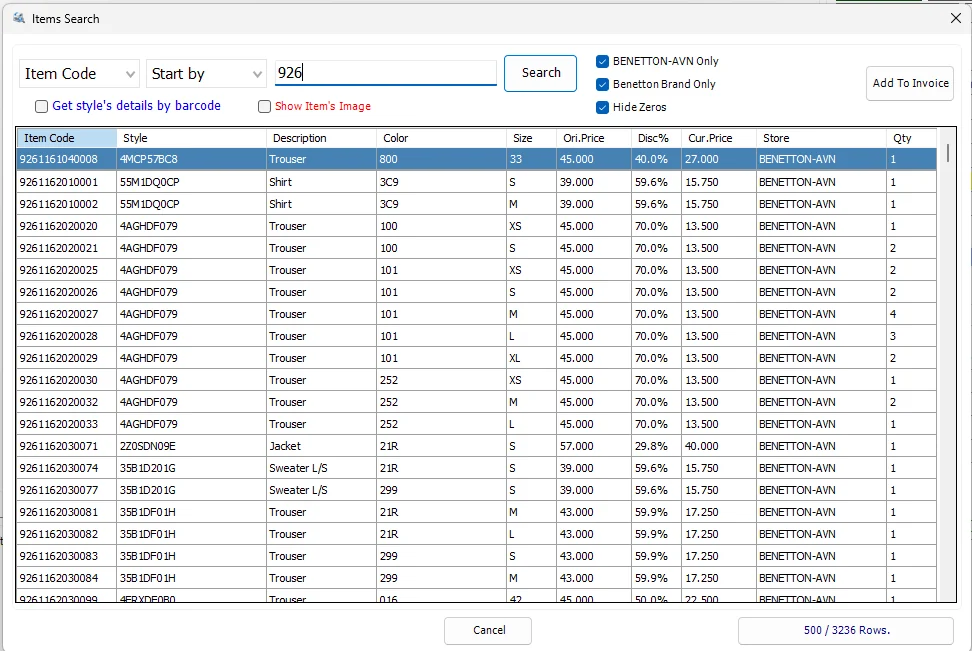
Search criteria
| Option | Behavior |
|---|---|
| Search By | Item Code, Barcode, Style or Description. |
| Criteria | Start by, End by, Contains or Exact Match. |
| Get style's details by barcode | Uses a scanned barcode to return the complete Style. |
| In MyStore | Restricts results to the current Store. |
| Brand Only | When applicable, restricts results to the Store's configured brand. |
| Hide Zeros | Removes rows whose Store stock quantity is zero. |
| Show Item's Image | Displays the selected Style/Color image when available. |
Results
Results include Item Code, Style, Description, Color, Size, Original Price, Discount %, Current Price, Store, Qty and Supplier ID.
Large result sets
IMS fetches results in batches of up to 500 rows. Load More Rows shows the loaded/total row count and retrieves the next batch.
Add to Invoice / Stock Transfer
When opened from Sales Transactions or Stock Transfer, Add To Invoice returns the selected Item Code to the calling screen and runs its normal add-item workflow. Double-clicking a selected row does the same. When opened directly from the main toolbar, Items Search works as a lookup window and the Add action is hidden.