
Options
Options controls local IMS appearance preferences and the default Windows printer/copy settings used by common transaction and report groups on the current workstation.
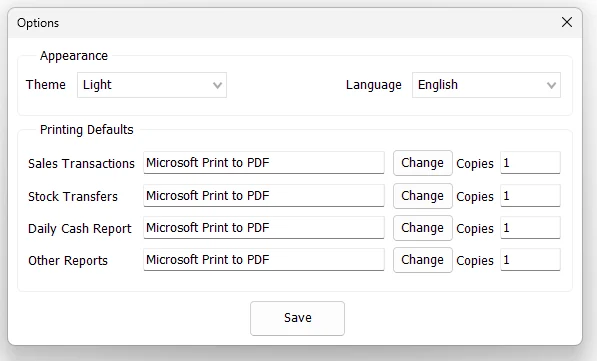
Appearance
| Setting | Purpose |
|---|---|
| Theme | Select the IMS appearance. The current client provides Default, Light and Dark theme choices. |
| Language | Select the installed IMS user-interface language. |
IMS applies the saved local Theme and Language selection when the application starts. If either setting is changed, Save asks whether IMS should restart immediately so the new appearance/language can be applied.
Printing Defaults
Options stores separate default printer settings for four print groups:
| Print group | Used for |
|---|---|
| Sales Transactions | The default printer and copy count for sales-transaction printing. |
| Stock Transfers | The default printer and copy count for Stock Transfer printing. |
| Daily Cash Report | The default printer and copy count for the Daily Cash Report. |
| Other Reports | The default printer and copy count for report printing that uses the general report-printing preference. |
The printer-name and Copies boxes are read-only in the Options screen. Use Change beside the required print group to open the standard Windows Print dialog.
Change a default printer
- Click Change beside the required print group.
- Select a Windows printer in the Print dialog.
- Select the required number of copies in that dialog.
- Return to Options and verify the selected printer and Copies value.
- Click Save.
IMS records the printer name and copy count returned by the Windows Print dialog separately for each of the four print groups.
Save local options
Click Save to store the current Theme, Language and printing defaults. IMS writes the settings to its local login/options data and records a Changed Local Options activity-log entry.
These settings are local client preferences rather than global company configuration, which allows different IMS workstations to use different printers and appearance settings where needed.