
Discount Coupons
Discount Coupons creates percentage-discount coupon events for use in sales transactions. An event can use one coupon code or generate a numbered series of coupon codes, and can control the expiry date, eligible stores, whether already-discounted items are included and whether a Star Card is required.
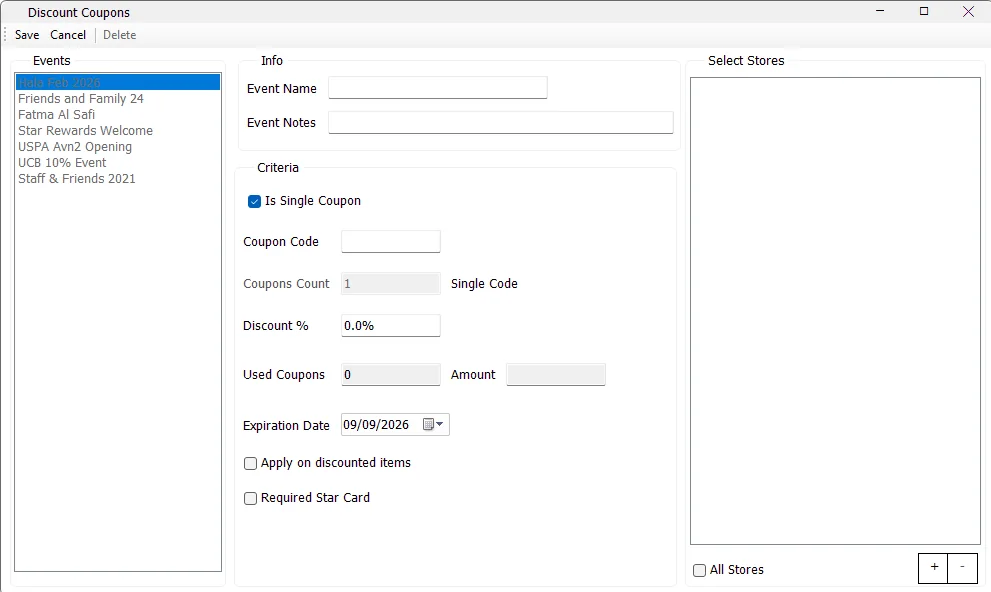
How Discount Coupons are organized
Each entry in the Events list is a coupon event. The event stores the shared rules, while IMS stores the actual coupon code or generated coupon codes associated with that event.
| Area | Purpose |
|---|---|
| Event Name | Friendly name used to identify the coupon campaign in IMS. |
| Event Notes | Optional notes associated with the coupon event. |
| Is Single Coupon | Creates one coupon code instead of a numbered series. |
| Coupon Code / Coupons Prefix | The exact code for a single coupon, or the prefix used to build a coupon series. |
| Coupons Count | Number of codes to generate when the event is a series. |
| Discount % | Percentage discount configured for the coupon. |
| Used Coupons / Amount | Shows recorded sales uses for the event's coupon IDs and the discount amount recorded by those sales transactions. |
| Expiration Date | Last configured validity date for the event. |
| Apply on discounted items | Allows the coupon rule to include items that are already discounted. |
| Required Star Card | Marks the coupon as requiring a Star Card in the coupon sales workflow. |
| Select Stores / All Stores | Controls the stores in which the coupon is allowed. |
Single coupon or coupon series
Single Coupon
Enable Is Single Coupon when the event uses one code. The field changes to Coupon Code, Coupons Count is disabled, and IMS creates one coupon ID using the entered code.
A single coupon code can contain up to 20 characters in this maintenance screen.
Coupon Series
Clear Is Single Coupon to create a numbered series. Enter a Coupons Prefix and a Coupons Count greater than 1. IMS generates the series by appending a four-digit sequence beginning with 0001.
The series prefix accepts up to 10 characters. The screen displays the resulting range as From: 0001 To: … while the event is being prepared.
Coupon criteria
| Setting | Behavior |
|---|---|
| Discount % | Required. The value must be greater than zero. |
| Expiration Date | Required. A new or changed event cannot be saved with an expiry date before today. |
| Apply on discounted items | Enable when the coupon is intended to apply even when qualifying items already carry a discount. |
| Required Star Card | Enable when the coupon event is tied to the Star Card/customer loyalty workflow. |
Select Stores
A coupon event must be assigned to at least one store before it can be saved.
Use the + button to select individual stores and − to remove selected stores. Enable All Stores to load the active retail stores that are eligible for normal coupon use. IMS excludes main-store, online-store and damage-store locations from this All Stores list.
For a coupon series, IMS applies the selected store scope to every generated coupon code in the event.
Used Coupons and Amount
When an existing event is selected, IMS checks sales transactions that contain one of the event's coupon IDs:
- Used Coupons shows the number of recorded sales transaction uses linked to the event's coupon IDs.
- Amount shows the accumulated discount amount calculated from those recorded transactions.
These fields are read-only and provide a quick indication that the event has already participated in sales.
Create a coupon event
- Click New. The toolbar changes to Save / Cancel.
- Enter the Event Name and optional Event Notes.
- Choose Is Single Coupon or create a coupon series.
- Enter the Coupon Code, or enter a Prefix and Coupons Count.
- Enter the Discount %.
- Set the Expiration Date.
- Choose whether the coupon applies on discounted items and whether a Star Card is required.
- Select specific stores or enable All Stores.
- Click Save. IMS validates the required name, coupon code/prefix, series count, discount percentage, expiry date and store scope before creating the event.
Edit and Delete
Select an event and click Edit to change it. Click Cancel to reload the saved values.
Once IMS finds sales transactions using coupon IDs from the event, it protects the core coupon definition: the Single/Series choice, coupon code or prefix, coupon count, Discount % and Required Star Card setting are locked from editing.
An event can be deleted only while none of its coupon IDs has been used in a sales transaction. Once it has been used, IMS blocks deletion to preserve the transaction reference.
Discount Coupons versus other promotions
| Discount Coupons | Special Offers | Give Away Promotions | |
|---|---|---|---|
| Primary purpose | Code-based percentage discount. | Conditional promotion engine: discount, Buy/Get, bundle, Cash Back and Step Discount. | Voucher campaign with controlled serial ranges and voucher denominations. |
| User/code input | Uses a coupon code or generated coupon-series code. | Normally triggered by transaction/store/client/item conditions. | Uses voucher serials/ranges in the voucher workflow. |
| Benefit | Percentage discount. | Percentage/fixed price/free item/bundle/Cash Back depending on offer type. | Voucher value/denomination. |
| Store scope | All eligible retail stores or selected stores. | Selected/All Stores, with additional Client and Item scopes. | Campaign stores plus separate voucher-redemption store scope. |
Permissions
Visibility of Manage → Discount Coupons is controlled by the IMS Manage Discount Coupons access policy. Users without that right do not see this menu item.
How IMS stores a coupon event
The event header is stored separately from the coupon IDs. A single-code event creates one coupon record; a series creates one coupon record for every generated Prefix + sequence value. When the event is limited to selected stores, IMS also records the allowed store mappings for those coupon IDs.