
Special Cards Profiles
Special Cards Profiles defines the operating rules for IMS Special Cards. A profile controls whether cards expire, whether they are one-time use, how they are redeemed, which Service Item is used for funding, and whether a recharge discount applies.
Open the screenManage → Special Cards Profiles.
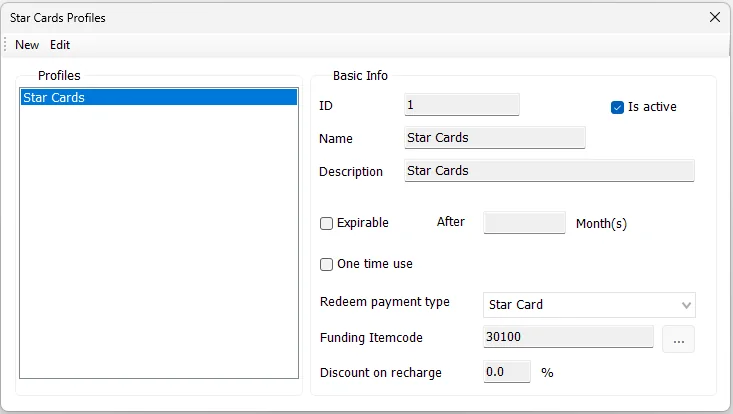
Profile settings
| Setting | Purpose |
|---|---|
| ID | Unique profile identifier. IMS proposes the next available ID when creating a new profile. |
| Name | Profile name shown when a Special Card is created or viewed. |
| Description | Optional description of the profile's intended use. |
| Is active | Marks the profile as active. |
| Expirable | Enables automatic expiration for cards created under the profile. |
| After … Month(s) | Number of months after issue before an expirable card expires. |
| One time use | Profile flag for cards intended for one-time-use behavior. |
| Redeem payment type | Payment method used for Special Card redemption. The available list comes from payment methods configured for Star Cards. |
| Funding Itemcode | Service Item used by the card funding/recharge workflow. The … button opens Service Items for selection. |
| Discount on recharge | Percentage discount associated with recharge. IMS accepts values up to 95%. |
Create a profile
- Click New.
- Confirm the proposed ID and enter a profile Name.
- Add a Description when useful.
- Enable Is active when the profile should be available for use.
- If cards should expire, enable Expirable and enter the number of months.
- Set One time use when appropriate.
- Select the Redeem payment type.
- Choose the required Funding Itemcode using the Service Items selector.
- Enter any Discount on recharge.
- Click Save.
Required setupIMS needs at least one payment method configured for Star Cards before profiles can be created or edited. A Funding Itemcode is also required when saving a profile.
Edit a profile
Select a profile and click Edit. The profile ID remains fixed while the other profile settings can be updated. Click Cancel to discard unsaved changes.
Expiration
When Expirable is enabled, IMS stores an expiration period in months. New cards created with that profile receive an expiration date calculated from the card issue date plus the configured number of months.